<?xml version="1.0" encoding="utf-8"?><feed xmlns="http://www.w3.org/2005/Atom" ><generator uri="https://jekyllrb.com/" version="4.4.1">Jekyll</generator><link href="https://happycoder.io/feed.xml" rel="self" type="application/atom+xml" /><link href="https://happycoder.io/" rel="alternate" type="text/html" /><updated>2026-04-03T06:38:10-05:00</updated><id>https://happycoder.io/feed.xml</id><title type="html">happycoder.io</title><subtitle>Enterprise-Grade Backend Engineering</subtitle><author><name>happycoder.io</name><email>contact@happycoder.io</email></author><entry><title type="html">Project Sunshine - The Box</title><link href="https://happycoder.io/blog/project-sunshine/the-box/" rel="alternate" type="text/html" title="Project Sunshine - The Box" /><published>2026-04-02T00:00:00-05:00</published><updated>2026-04-02T00:00:00-05:00</updated><id>https://happycoder.io/blog/project-sunshine/project-sunshine-the-box</id><content type="html" xml:base="https://happycoder.io/blog/project-sunshine/the-box/"><![CDATA[<p>I consider this to be part 0, as the setup here might be very specific to where you get your box. I’m using Ubuntu here as the OS of choice but it can be any other linux flavor as well.</p>

<p>Most vendors will probably have documentation with a basic setup guide for what you should be doing in order to be able to connect to it. I’m going to assume that it comes with a new user, either a password or preferably an authorized ssh key.</p>

<h2 id="basic-setup">Basic Setup</h2>
<p>I’m not going to be diving deep into this as I’m not a linux sys admin nor do I want to pretend like I am. So I’ve followed the docs from my vendor <a href="https://community.hetzner.com/tutorials/basic-cloud-config">here</a>.</p>

<p>This setup means I now have a:</p>
<ol>
  <li>Linux box with a new user with admin privileges</li>
  <li>SSH configured using a public key on port 2222 and hardened disallowing some features we will not be using</li>
  <li>A basic firewall allowing, for now, just port 2222. If your vendor includes a firewall upstream from your box you should use that too to not rely on a single layer of defense.</li>
  <li>Updated all the packages and made sure they’re all current</li>
  <li>Put in some basic countermeasures for intrusion prevention</li>
</ol>

<p>That’s all we need for now on the server end. With this set we can get started on the actual application.</p>

<h2 id="bitwarden">Bitwarden</h2>
<p>While this has nothing to do with the server, I do want to call out that I’m using bitwarden, hosted in Europe, for my passwords/keys. The reason I mention this is because I think it ties in really nicely with server authentication.</p>

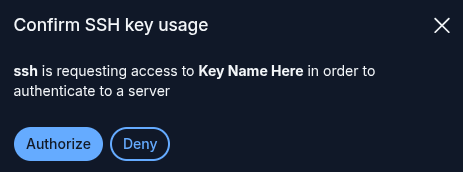
<p>I store my SSH keys in bitwarden and I’ve set it up to integrate with the ssh-agent as described <a href="https://bitwarden.com/help/ssh-agent/">here</a>. This means that, whenever I use <code class="language-plaintext highlighter-rouge">ssh</code> or <code class="language-plaintext highlighter-rouge">scp</code> or any other CLI tool, I will get a neat popup from bitwarden before it grants usage to the key like this:
<img src="/assets/img/bitwarden-ssh-prompt.png" alt="bitwarden prompt" /></p>

<p>The one caveat with this is that, as of writing, it doesn’t deal well with having a lot of ssh keys. I’ve solved this by creating individual files with the public key in each and then set that as the <code class="language-plaintext highlighter-rouge">IdentityFile</code>. The script for creating one of these is (replacing <code class="language-plaintext highlighter-rouge">test</code> for the name of your key)</p>
<div class="language-bash highlighter-rouge"><div class="highlight"><pre class="highlight"><code>ssh-add <span class="nt">-L</span> | <span class="nb">grep</span> <span class="s2">"test"</span> <span class="o">&gt;</span> ~/.ssh/server.pub
</code></pre></div></div>
<p>Then you can use that pub file as the <code class="language-plaintext highlighter-rouge">IdentityFile</code> when connecting. In my case I do this through an entry in <code class="language-plaintext highlighter-rouge">~/.ssh/config</code> like:</p>
<div class="language-ini highlighter-rouge"><div class="highlight"><pre class="highlight"><code><span class="na">Host</span><span class="w"> </span><span class="na">test-server</span><span class="w">
    </span><span class="na">HostName</span><span class="w"> </span><span class="na">{your-ip}</span><span class="w">
    </span><span class="na">User</span><span class="w"> </span><span class="na">{your-username}</span><span class="w">
    </span><span class="na">Port</span><span class="w"> </span><span class="na">2222</span><span class="w">
    </span><span class="na">IdentityFile</span><span class="w"> </span><span class="na">~/.ssh/server.pub</span><span class="w">
</span></code></pre></div></div>
<p>And with that set I can now connect using <code class="language-plaintext highlighter-rouge">ssh test-server</code> or use that name instead of the ip and username in <code class="language-plaintext highlighter-rouge">scp</code> etcetera.</p>

<h2 id="comparison-with-cloud">Comparison With Cloud</h2>
<p>When deploying to the cloud, none of this needs to be setup, you would have different setup to do though. Creating a user within your account, assigning that user privileges and then keeping it’s credentials/tokens securely somewhere. We’ll get to a more interesting comparison later as we start looking at actually hosting the application and other ‘services’ it needs.</p>

<p>Having this does mean that you’re now on the hook for making sure it stays up to date. This can be as simple as a weekly login and running updates on your package manager though.</p>]]></content><author><name>Hans</name></author><category term="Self-hosted" /><category term="Server-Setup" /><summary type="html"><![CDATA[I consider this to be part 0, as the setup here might be very specific to where you get your box. I’m using Ubuntu here as the OS of choice but it can be any other linux flavor as well.]]></summary><media:thumbnail xmlns:media="http://search.yahoo.com/mrss/" url="https://happycoder.io/assets/img/project-sunshine-the-box.svg" /><media:content medium="image" url="https://happycoder.io/assets/img/project-sunshine-the-box.svg" xmlns:media="http://search.yahoo.com/mrss/" /></entry><entry><title type="html">Project Sunshine - No More Cloud - Intro</title><link href="https://happycoder.io/blog/project-sunshine/" rel="alternate" type="text/html" title="Project Sunshine - No More Cloud - Intro" /><published>2026-04-01T00:00:00-05:00</published><updated>2026-04-01T00:00:00-05:00</updated><id>https://happycoder.io/blog/project-sunshine-intro</id><content type="html" xml:base="https://happycoder.io/blog/project-sunshine/"><![CDATA[<p>Like many others, the last couple of years have meant a deep dive into cloud development/delivery. For me personally, I’ve been deploying everything I could think of to AWS using terraform. I really like how it enabled me to rely less on others and own not just the code and testing but also the deployment and ‘getting it to production’.</p>

<p>Recently I’ve been looking to see what exists outside of the cloud/hyperscalers. Getting back to the basics is great as it gives you some new perspectives on what options you have when there’s no push towards putting everything in the cloud.</p>

<p>So in this series I’m going to walk you through all the things I had to do to deploy a relatively simple application outside of the cloud. There are a lot of lessons to be learnt here and it does make you appreciate all of the bells and whistles that you get out of the box. However, learning and knowing these skills I think is essential as it gives you options. Sometimes the cloud is the right place, sometimes it isn’t.</p>

<h2 id="what-this-series-covers">What this series covers</h2>

<p>Every post tackles one part of what had to happen in order to make this application run. I’ve written out all the parts that I think I will have but I might end up removing/adding things later as things change.</p>

<p>At the time of writing we’re talking about a straightforward API written in .net core, using some persistent storage as well as a relational database. Along with every topic I’ll try to make a cost comparison as well.</p>

<h3 id="part-0--the-box">Part 0 — <a href="/blog/project-sunshine/the-box/">The Box</a></h3>
<p>Getting a VPS, basic firewall configuration. The boring foundation everything else sits on.</p>

<h3 id="part-1--the-front-door">Part 1 — The Front Door</h3>
<p>Nginx as a reverse proxy. Static site hosting and setting up TLS certificates with Let’s Encrypt. Routing traffic through to things that aren’t static sites.</p>

<h3 id="part-2--containers-for-the-application">Part 2 — Containers For The Application</h3>
<p>Running the application in a container with podman. This removes the need for installing a lot of things on the server itself and should limit the attack surface significantly. Running it this way should also help with scaling out later if need be as well as with portability of systems between machines.</p>

<h3 id="part-3--the-database">Part 3 — The Database</h3>
<p>Running an RDBMS yourself, as a container, with persistence and backups taken care of. As a developer (and not a DBA) this might be the most daunting task to get right.</p>

<h3 id="part-4--persistent-storage">Part 4 — Persistent Storage</h3>
<p>Not all data is relational, so we’ll talk about how we can use object storage within our API.</p>

<h3 id="part-5--deployment">Part 5 — Deployment</h3>
<p>Going from source control to an actual running process. Building a container or publishing static files, how do we perform updates without or with minimal downtime.</p>

<h3 id="part-6--observabilitymonitoring">Part 6 — Observability/Monitoring</h3>
<p>When things inevitably go down, I want to find out myself as opposed to getting an email from a customer. So let’s dive into logging, monitoring and alerting.</p>

<h3 id="part-7--disaster-recovery">Part 7 — Disaster Recovery</h3>
<p>A backup strategy and actually testing those backups. How do we survive the loss of the entire server?</p>

<h2 id="caveats">Caveats</h2>
<p>This series assumes you have a machine that you have root access to via SSH. This might even be in one of the hyperscalers if you really want to.</p>

<p>Currently, I’m going to assume that the API runs on a single box. I’m very aware of the limits that puts on being able to quickly scale up. Almost all machines will be virtual though, so upgrading to a bigger box should be a few clicks.</p>

<p>This does mean upgrades/server reboots involve some down time, if this is truly unacceptable, this series is not for you. Keep in mind though that to get 99.99% uptime, you are allowed to be down just over a minute a week. If you keep your setup lean, a reboot should easily be less than a minute and much less often than weekly.</p>]]></content><author><name>Hans</name></author><category term="Infrastructure" /><category term="Cloud" /><category term="Self-hosted" /><summary type="html"><![CDATA[Like many others, the last couple of years have meant a deep dive into cloud development/delivery. For me personally, I’ve been deploying everything I could think of to AWS using terraform. I really like how it enabled me to rely less on others and own not just the code and testing but also the deployment and ‘getting it to production’.]]></summary><media:thumbnail xmlns:media="http://search.yahoo.com/mrss/" url="https://happycoder.io/assets/img/project-sunshine-banner.svg" /><media:content medium="image" url="https://happycoder.io/assets/img/project-sunshine-banner.svg" xmlns:media="http://search.yahoo.com/mrss/" /></entry><entry><title type="html">First Pass European Company Setup</title><link href="https://happycoder.io/blog/european-company-setup/" rel="alternate" type="text/html" title="First Pass European Company Setup" /><published>2026-03-24T00:00:00-05:00</published><updated>2026-03-24T00:00:00-05:00</updated><id>https://happycoder.io/blog/european-company-setup</id><content type="html" xml:base="https://happycoder.io/blog/european-company-setup/"><![CDATA[<p>Clearly, I’ve just started a new company 😁. Since this is not the first time I’ve done that, I knew that there’s a lot of ‘things’ you need to do that have nothing to do with your actual work but with getting an actual company of the ground. Over the past couple of years I’ve done everything in the cloud, AWS in particular. For my new company I wanted to see however if I could do things in Europe, because I like to spend my money close to home. So since I now have had a first hand look at what it takes, I figured I would take you all along for the ride to see what it really takes to run your company on European tech.</p>

<p>I’ve made good progress, but we’re not there yet as you’ll see. But this just means that I might follow this up as I tackle other services.</p>

<h2 id="email--soverin-">Email — Soverin 🇳🇱</h2>

<p>First things first, I need people to be able to reach me through email. Email is not something I’m willing to host myself, while it might be trivial to get working, it is hard to get right. And in the worst case scenario, all your mails will go to peoples’ spam folders…</p>

<p>So, for email I went with <a href="https://soverin.net">Soverin</a>, a Dutch provider based in Amsterdam. They offer custom domain email hosting for a few euros per month with no ads, no data mining, and a clean privacy policy.</p>

<p>Setup was painless: point your MX records at their servers, verify your domain, and you’re done. They support standard protocols (IMAP/SMTP), which means any proper email client works.</p>

<p>On the client side I use <strong>Mozilla Thunderbird</strong>. It’s open source, runs on all platforms, and handles multiple accounts well. No Electron bloat, no telemetry — just a solid mail client that does exactly what it should.</p>

<p>The combination of Soverin + Thunderbird gives you full control: email stays in the EU, you own your domain, and you’re not locked into any proprietary ecosystem.</p>

<p><strong>Cost:</strong> ~€3/month for Soverin.</p>

<h2 id="website--hetzner-vps-">Website — Hetzner VPS 🇩🇪</h2>

<p>This one might seem a bit controversial. Why on earth would I run a site like this on a VPS. Yes, this is a completely static site, no server side processing whatsoever. There are plenty of options for hosting static sites like Github pages for example. However those aren’t European and a website is just a start, I have many other things to run as well. If your company just needs a website and nothing else, this might not be the setup for you.</p>

<p>The site runs on a VPS with <a href="https://www.hetzner.com">Hetzner</a>. Their data centres are in Germany and Finland, and they’re well known for having some of the best price-to-performance in the European VPS market.</p>

<p>This site is a static Jekyll build, so the server requirements are minimal — a small Hetzner instance is more than enough. Nginx serves the static files, and <a href="https://certbot.eff.org/">Certbot</a> handles the SSL certificate via Let’s Encrypt. Yes, technically Certbot is run by a US non profit but this is good enough for me.</p>

<p>Coming from the cloud, this means some actual server management but running a static site isn’t the hardest. More details on that later.</p>

<p><strong>Cost:</strong> ~€3/month depending on the instance size.</p>

<h2 id="git-hosting-">Git hosting 💪</h2>

<p>A version control system is unavoidable, and since for my own company I need exclusive access just for myself I have a lot of options. For this I decided to self host <a href="https://forgejo.org/">forgejo</a> on that same VPS. It runs in a docker container and is only accessible through my pre-existing SSH tunnel.</p>

<p>This forgejo instance serves all my coding and documentation needs. Anything that I want to keep can go in there, it’s versioned and backed up.</p>

<h2 id="what-i-havent-solved-for">What I haven’t solved for</h2>

<p>There are a few things that I still depend on cloud/big tech:</p>
<ol>
  <li>domain registration, currently in AWS. This should be easy to change though</li>
  <li>calendar, business versus personal calendar as my personal calendar is with Google</li>
  <li>github, I still have a github account and some of my own code lives there, some of this code needs to be public facing though</li>
</ol>

<hr />

<p>This is the absolute minimum. As the company grows I will be adding other services, I’ll add follow up posts as I add those.</p>]]></content><author><name>Hans</name></author><category term="Infrastructure" /><category term="Privacy" /><category term="Self-hosted" /><summary type="html"><![CDATA[Clearly, I’ve just started a new company 😁. Since this is not the first time I’ve done that, I knew that there’s a lot of ‘things’ you need to do that have nothing to do with your actual work but with getting an actual company of the ground. Over the past couple of years I’ve done everything in the cloud, AWS in particular. For my new company I wanted to see however if I could do things in Europe, because I like to spend my money close to home. So since I now have had a first hand look at what it takes, I figured I would take you all along for the ride to see what it really takes to run your company on European tech.]]></summary><media:thumbnail xmlns:media="http://search.yahoo.com/mrss/" url="https://happycoder.io/assets/img/eu-flag.svg" /><media:content medium="image" url="https://happycoder.io/assets/img/eu-flag.svg" xmlns:media="http://search.yahoo.com/mrss/" /></entry></feed>